Direct Answer
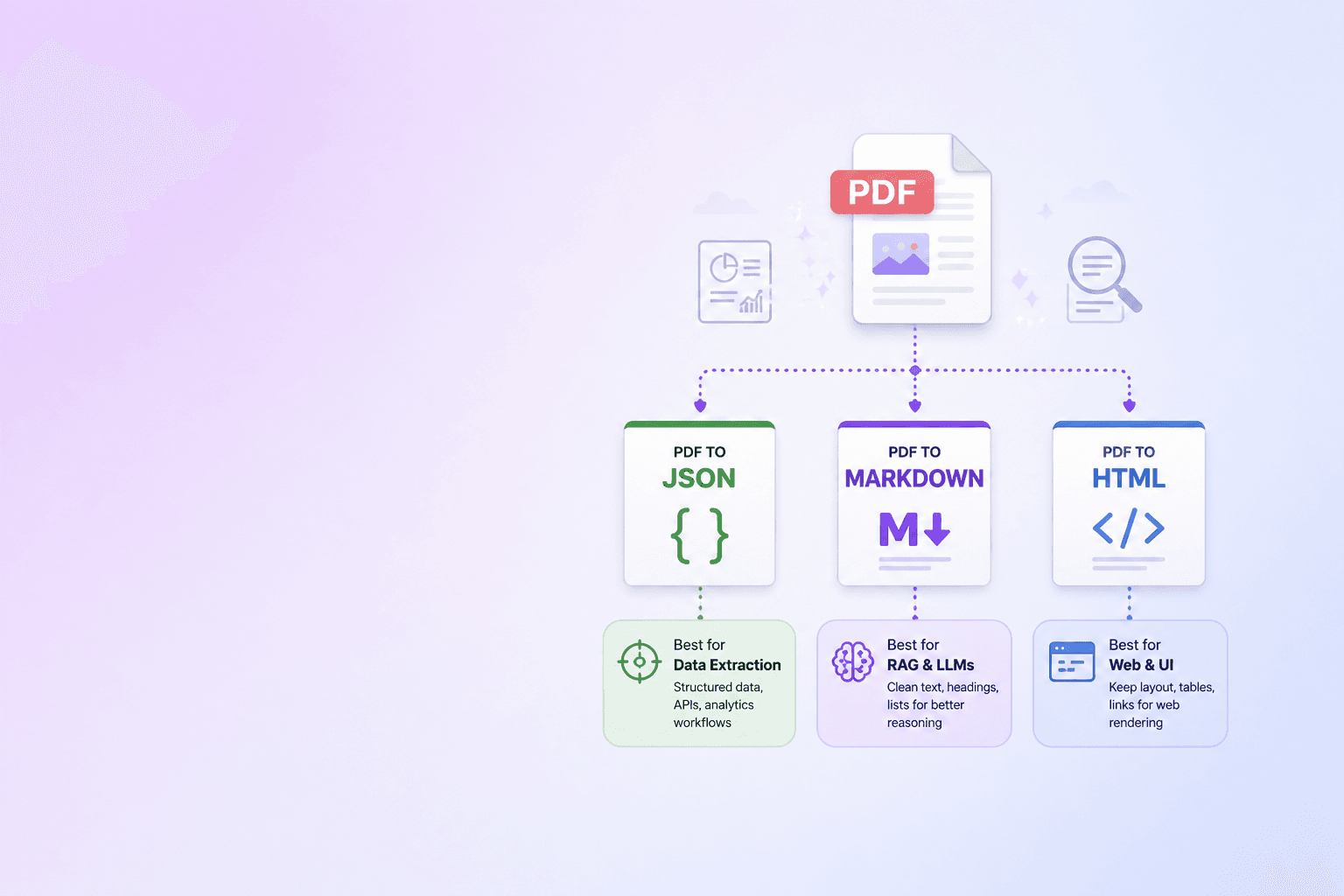
Use PDF to JSON when software needs structured fields and tables, PDF to Markdown when LLMs or RAG systems need clean readable context, and PDF to HTML when humans need visual review or browser-based publishing.
There is no single best output format for every PDF workflow.
JSON, Markdown, and HTML each preserve a different kind of value:
- JSON preserves structure for machines.
- Markdown preserves meaning for readers and LLMs.
- HTML preserves richer layout for review and publishing.
If you are building an AI, automation, or document intelligence workflow, the question is not "How do I extract text from a PDF?" The better question is: "What shape should the extracted document take after parsing?"
This guide explains when to use each format and how to combine them into one reliable pipeline.
Why PDF extraction needs a target format
PDFs are designed to preserve appearance. They are excellent for sharing final documents, contracts, invoices, reports, forms, and printable files.
But automation systems need something else:
- fields
- rows and columns
- headings
- paragraphs
- links
- sections
- citations
- metadata
That structure is often implicit in the PDF. A parser has to reconstruct it.
Choosing the right output format makes the rest of the workflow easier. Choosing the wrong one creates problems downstream.
PDF to JSON: best for structured automation
JSON is the best target when code needs to process the document.
Use PDF to JSON for:
- invoice extraction
- table extraction
- contract metadata
- form fields
- compliance checklists
- page-level coordinates
- document review queues
- data validation
- ETL pipelines
JSON lets you preserve both content and machine-readable context.
Example:
{
  "document": {
    "title": "Invoice 1042",
    "pageCount": 2
  },
  "fields": {
    "invoiceNumber": "1042",
    "dueDate": "2026-05-15",
    "total": "1240.00"
  },
  "tables": [
    {
      "page": 1,
      "columns": ["Item", "Quantity", "Amount"],
      "rows": [
        ["Consulting", "10", "1000.00"],
        ["Support", "1", "240.00"]
      ]
    }
  ]
}
This is not the prettiest format for humans, but it is the most useful format for software.
Advantages of PDF to JSON
JSON is deterministic. It can be validated, transformed, tested, and loaded into databases.
It works well when the output feeds:
- APIs
- queues
- spreadsheets
- databases
- workflow engines
- validation rules
- analytics systems
If your workflow includes code, JSON should be part of the extraction output.
Limitations of PDF to JSON
JSON can become verbose. It is not always pleasant for long-form prose, and LLMs do not need every bounding box or layout coordinate for every paragraph.
For RAG, JSON is excellent as metadata, but Markdown is often better as the main text representation.
PDF to Markdown: best for LLMs and RAG
Markdown is the best target when humans and language models both need to read the extracted content.
Use PDF to Markdown for:
- RAG ingestion
- AI agent knowledge bases
- policy documents
- technical documentation
- research papers
- internal handbooks
- support articles
- searchable knowledge bases
Markdown keeps structure without heavy markup.
Example:
# Vendor Security Policy

## Data Retention

Customer documents are retained only for the duration required to process the requested workflow.

## Subprocessors

| Provider | Purpose | Data type |
| --- | --- | --- |
| Hosting provider | Runtime infrastructure | Encrypted files |
| Email provider | Notifications | Email address |
This is much easier for an LLM to consume than raw PDF text because headings and tables survive.
Advantages of PDF to Markdown
Markdown is:
- compact
- readable
- easy to diff
- easy to chunk
- easy to inspect
- friendly to embeddings
- supported by documentation tools
For LLM-ready documents, this is often the most practical format.
Markdown also lets engineers debug the extraction step. If the Markdown looks wrong, the RAG results probably will too.
Limitations of PDF to Markdown
Markdown cannot represent every visual detail. Complex nested tables, multi-column layouts, floating annotations, and exact typography may need HTML or JSON metadata.
That is fine. Markdown should preserve meaning, not recreate every pixel.
PDF to HTML: best for review and publishing
HTML is the best target when the output needs to be viewed in a browser or preserve richer layout.
Use PDF to HTML for:
- document preview interfaces
- browser-based review tools
- publishing workflows
- searchable knowledge portals
- side-by-side QA
- layout-aware extraction review
- internal content migration
HTML can preserve more structure than Markdown:
- nested elements
- links
- spans
- anchors
- tables
- semantic sections
- inline styling
Example:
<article>
  <h1>Vendor Security Policy</h1>
  <section>
    <h2>Data Retention</h2>
    <p>Customer documents are retained only for the duration required...</p>
  </section>
</article>
Advantages of PDF to HTML
HTML works well when humans need to inspect extraction quality. You can render it in a browser, highlight problem regions, attach comments, and compare it to the source PDF.
It is also useful when turning old PDFs into web pages or documentation articles.
Limitations of PDF to HTML
HTML is noisier than Markdown. If the HTML includes too many styles, wrappers, and layout artifacts, it can become poor LLM context.
For RAG, use clean semantic HTML or convert HTML to Markdown before chunking.
Format comparison table
| Output format | Best for | Strength | Weakness |
|---|---|---|---|
| JSON | APIs, tables, automation | Deterministic structure | Verbose for prose |
| Markdown | LLMs, RAG, documentation | Clean semantic text | Limited layout detail |
| HTML | Review, publishing, browser UI | Rich browser rendering | Can be noisy |
| Plain text | Quick search, simple extraction | Easy to generate | Loses structure |
Plain text is not useless. It is just rarely enough for serious automation.
Recommended pipeline: parse once, emit three formats
The strongest architecture is not choosing only one output. It is parsing once and emitting multiple views.
Step 1: Extract document structure
Use a parser to detect:
- pages
- text blocks
- tables
- headings
- links
- images
- metadata
- warnings
Step 2: Emit JSON
JSON becomes the canonical machine-readable extraction layer. Store it for audit, debugging, validation, and deterministic processing.
Step 3: Emit Markdown
Markdown becomes the LLM and RAG layer. Chunk this by heading and section, not by arbitrary page windows.
Step 4: Emit HTML
HTML becomes the review and publishing layer. Use it to inspect whether extraction preserved meaning.
Step 5: Keep references back to the source PDF
Every extracted block should retain source metadata:
- file ID
- page number
- bounding box, if available
- section path
- extraction confidence or warnings
This makes citations and quality review possible.
Which format should you index for RAG?
For most RAG pipelines, index Markdown chunks with JSON metadata.
That means each chunk might look like:
{
  "content": "## Data Retention\n\nCustomer documents are retained...",
  "metadata": {
    "source": "vendor-security-policy.pdf",
    "pageStart": 3,
    "pageEnd": 4,
    "section": "Data Retention",
    "contentType": "policy"
  }
}
The Markdown gives the model readable context. The JSON metadata gives the retriever filters and citations.
For table-heavy documents, index Markdown tables and keep the structured JSON table alongside them.
Where ShellPDFs fits
ShellPDFs gives teams practical tools around this workflow:
- PDF to JSON / Excel for inspecting structured extraction
- Markdown to PDF for reviewing and publishing Markdown outputs
- Webpage to PDF for turning public web pages into stable PDF snapshots before extraction
The current best practice is to keep sensitive preprocessing local where possible. Browser-based extraction reduces unnecessary document exposure, especially when you are working with internal policies, contracts, customer documents, or financial files.
If you are preparing content for AI agents, pair this article with Preparing PDF Data for AI Agents with Clean Markdown. It focuses specifically on Markdown as a RAG-ready intermediate layer.
JSON is for systems, Markdown is for reasoning, and HTML is for review. The best PDF extraction pipeline can produce all three.
Common workflow examples
Invoice automation
Use JSON first.
Extract fields, totals, vendor names, line items, and dates. Store the source page numbers and confidence warnings. Markdown is optional unless a human or LLM needs to summarize the invoice.
Policy RAG
Use Markdown plus JSON metadata.
Preserve headings, clauses, exceptions, and tables. Chunk by section. Keep page numbers for citations.
Contract review
Use all three.
JSON stores clauses and metadata. Markdown feeds summarization and Q&A. HTML powers a review interface where legal or operations teams can inspect extracted sections.
Documentation migration
Use HTML and Markdown.
HTML helps preserve richer structure during review. Markdown becomes the final authoring format for docs platforms and AI ingestion.
Research archive
Use Markdown for summaries, JSON for references, and the original PDF for source-of-truth preservation.
How to choose quickly
Ask one question: who is the next reader?
- If the next reader is code, choose JSON.
- If the next reader is an LLM or engineer, choose Markdown.
- If the next reader is a browser UI, choose HTML.
- If the next reader is a printer, keep PDF.
Most serious systems have more than one reader, so they need more than one representation.
Final recommendation
Do not stop at raw text. Extract PDF structure into a format that matches the job:
- JSON for reliable automation
- Markdown for RAG and LLM context
- HTML for review and publishing
That is how PDF extraction becomes a dependable document pipeline instead of a fragile text dump.
Start with structured extraction, then choose the right output format for your AI or automation workflow.
Open PDF to JSON / ExcelFrequently Asked Questions
Free Tool
PDF to JSON
Turn any PDF into structured data — tables, text, and metadata — instantly in your browser.
Try PDF to JSONShellPDFs Team
The ShellPDFs editorial group writes and maintains guides for everyday PDF workflows, with updates made when tool behavior or documented limits change. See our editorial standards for the process behind each article.
Focus: PDF extraction, structured document workflows, and AI-ready content formats
Questions or feedback? Get in touch.